Municipal Input Schedule
Overview
Use the Input Schedule to enter or review municipal premium data for the selected year, state, company, and quarter.

The Input Schedule is located under Company Information in the Municipal navigation pane. For Kentucky, the schedule is quarter-specific and appears with the selected quarter, such as Input Sch Qtr 1.
The information entered on the Input Schedule is used to calculate municipal returns and populate related schedules.
Review the Input Schedule
The Input Schedule lists municipalities for the selected state. Each row includes the municipality code, municipality name, and filing-related fields for that municipality.
Columns include:
- Code
- Municipality
- City Assigned Code
- Overpayment from Prior Period (Kentucky only)
- Premium columns
- Adjustment columns
- Total Premiums
- Vendor Number
City Assigned Code
The City Assigned Code is the account number or identifying code assigned to your company by the city or municipality.
Enter the city assigned code when it should be included with the return or related filing information.
Overpayment from Prior Period
The Overpayment from Prior Period column displays overpayments carried forward from a previous filing period. This is for Kentucky only.
If this is your first time using Stratus Municipal Pro, overpayments from the previous platform may not appear automatically. Stratus Municipal Pro and the previous platform do not share data, so any prior overpayment amounts may need to be manually entered or copied into Stratus.
Premium Columns
Enter premium amounts in the appropriate premium type columns.
Premium columns may include items such as:
- Casualty Premiums
- Fire and Allied Peril Premiums
- Health Premiums
- Inland Marine Premiums
- Life Premiums
- Motor Vehicle Premiums
- Other Premiums
The available premium columns may vary by state.
Adjustment Columns
Use adjustment columns when adjustment amounts need to be reported separately from the premium amounts.
Adjustment columns may correspond to the premium categories on the schedule.
Total Premiums
The Total Premiums column displays the total premium amount for the municipality based on the amounts entered or imported on the schedule.
Vendor Number
Use the Vendor Number column to enter the vendor number for the municipality.
Vendor numbers entered on the Input Schedule can flow to the Payment Request Schedule.
Save Changes
After entering or editing values on the Input Schedule, select Save on the right side of the screen.
Unsaved changes may not be included on the municipal returns or related schedules.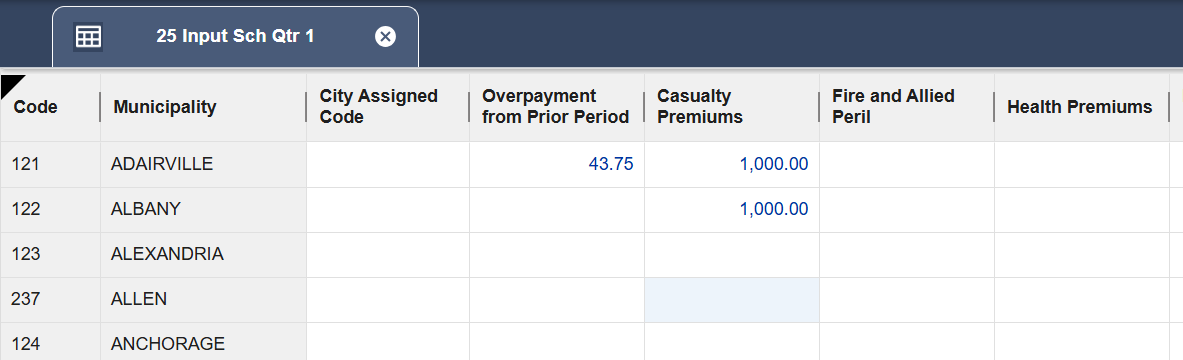
Related Articles